NginX and X-Forwarded-Proto:HTTPS behind a load balancer
A quick note about https traffic behind crooked load balancers. We have Setting up Nginx + php-fcgi behind a load balancer. A load balancer is like a woman - nobody understands her as poorly as she understands herself.
So the load balancer (aka LB) handles either https or http traffic. You can set up SSL Termination on the LB, but it still talks to the servers on port 80. In that case the site doesn’t get the https header set to on. With various secure session validations in place, this ends up as an infinite redirect and an error.
But the LB sends the connection protocol via the X-Forwarded-Proto header. That’s what we’ll catch.
To make NginX turn the X-Forwarded-Proto: HTTPS header into HTTPS: on you need to edit the main config file /etc/nginx/nginx.conf.
In the http section, which looks like this:
http {
    ...
}
Insert the following code:
map $http_x_forwarded_proto $fastcgi_https {
        default off;
        https on;
    }
If you add it anywhere else, you’ll get this error when restarting nginx:
nginx: [emerg] `map` directive is not allowed here
If you just use $https instead of $fastcgi_https, you’ll get this error:
nginx: [emerg] the duplicate `https` variable in /etc/nginx/nginx.conf
The thing is, starting from some ancient version NginX has a built-in $https variable, so you can’t reuse it.
Edit /etc/nginx/fastcgi_params:
Comment out / remove:
fastcgi_param HTTPS $https if_not_empty;
Add:
fastcgi_param  HTTPS              $fastcgi_https if_not_empty;
fastcgi_param  SERVER_PORT $http_x_forwarded_port;
Restart nginx for the changes to take effect.
Check with phpinfo and see that everything works:
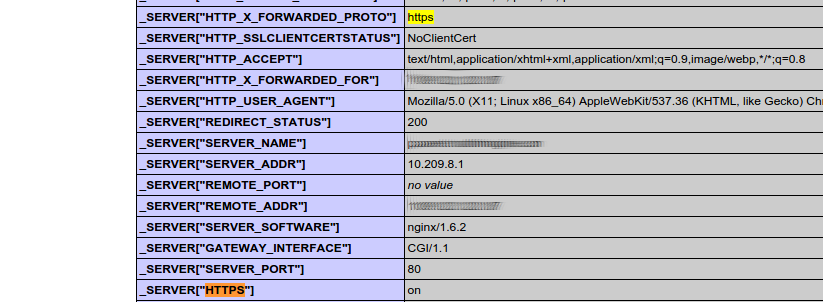
A picture like that breaks the mold.