Varnish Configuration Review
There are plenty of articles about how to configure Varnish. Let me say right away that there’s no single correct approach to configuration. The more options you specify in the config file, the more unexpected circumstances can pop up.
In this article I want to go over the VCL language used to configure Varnish and look at some configuration options. Also a heads up: Varnish doesn’t support SSL.
So, Varnish configuration is described in two files:
/etc/default/varnishfor Debian/Ubuntu (/etc/sysconfig/varnishfor RedHat/CentOS)/etc/varnish/default.vcl
The first one describes the configuration of the Varnish daemon. You can set the following parameters:
START=yes
INSTANCE=$(uname -n)
The key section in it is DAEMON_OPTS:
DAEMON_OPTS="-a public_ip_address:port \
  -f path_to_vcl_file \
  -T admin_ip_address:admin_port \
  -t ttl_value \
  -w min_number_of_varnish_processes,max_number_of_varnish_processes,process_lifetime \
  -s cache_storage"
Below is an example of a DAEMON_OPTS section. In this case Varnish will work with the /etc/varnish/default.vcl file. The object cache will be stored in a 1Gb file located on disk at /var/lib/varnish/$(uname -n)/varnish_storage.bin:
DAEMON_OPTS="-a :80 \
 -T localhost:6082 \
 -t 120 \
 -w 10,30,50\
 -f /etc/varnish/default.vcl \
 -S /etc/varnish/secret \
 -s file,/var/lib/varnish/$INSTANCE/varnish_storage.bin,1G"
Below is another example of a DAEMON_OPTS section. In this case Varnish will work with the /etc/varnish/website.vcl file. The object cache will be stored in RAM (malloc) with 256Mb allocated for it.
DAEMON_OPTS="-a :80 \
 -T localhost:6082 \
 -t 120\
 -w 10,30,50\
 -f /etc/varnish/website.vcl \
 -S /etc/varnish/secret \
 -s malloc,256m"
Going back to the point that there’s no single correct approach to configuration - depending on whether you’re caching static content (images, css files, js scripts) or not, you need to use a different cache storage.
In my practice there were sites whose pages had a lot of static objects in the form of images, which significantly increased page load time. The images rarely changed. In that case you can store the cache in a file on local disk and cache whole pages, including the static objects. Page delivery speed increased significantly with this approach (3-5 times).
This blog runs on a weak server, the pages are light and don’t need many resources to serve. Varnish is set up so that static requests go straight to Nginx, and everything else gets cached/served from cache. In this case objects are stored in RAM with a 256 MB limit. That’s plenty.
Let’s look at the file with the vcl extension in the /etc/varnish folder, set via the -f key in the DAEMON_OPTS section. It starts with describing the so-called backends. In this case backend is the actual Apache or NginX that the site runs on. This section looks like this:
backend default {
.host = "127.0.0.1";
.port = "8080";
}
You can add a health check:
backend default {
  .host = "127.0.0.1";
  .port = "8080";
  .probe = {
.url = "/";
.timeout = 0.3 s;
.window = 8;
.threshold = 3;
.initial = 3;
  }
}
If you have several servers and you’re also using Varnish as a load balancer, then you can declare several backends and combine them into a director:
backend www1 { .host = "192.168.0.10"; .port = "80";}
backend www2 { .host = "192.168.0.20"; .port = "80";}
backend www3 { .host = "192.168.0.30"; .port = "80";}
backend static { .host = "192.168.0.45"; .port = "80";}

director www round-robin {
  { .backend = www1; }
  { .backend = www2; }
  { .backend = www3; }
}
Next comes the description of the so-called subroutines, which apply to all requests passing through Varnish.
Standard subroutines:
- vcl_recv
- vcl_pipe
- vcl_pass
- vcl_hash
- vcl_hit
- vcl_miss
- vcl_fetch
- vcl_deliver
- vcl_error
The general sequence of how Varnish works can be described with the following diagram:
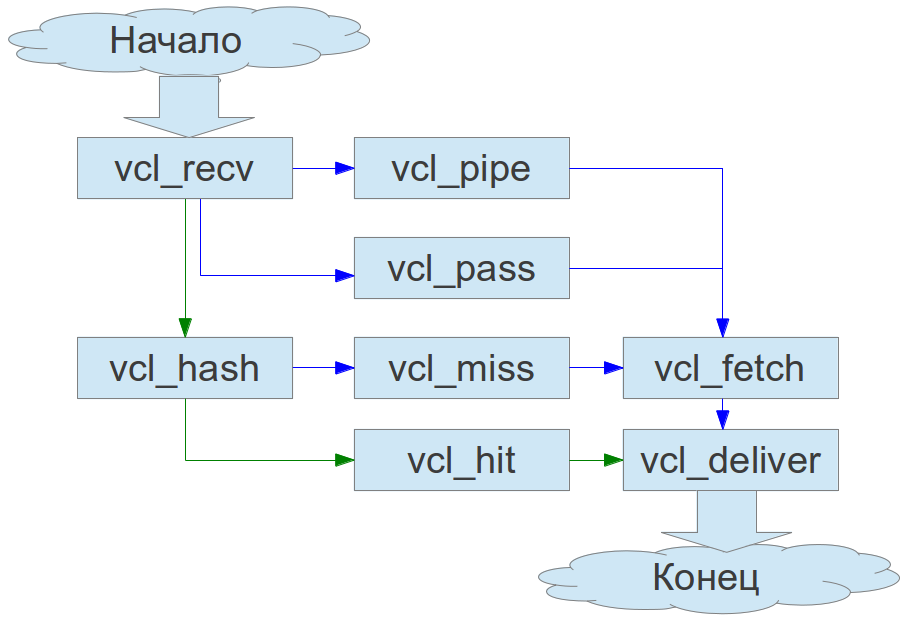
1. vcl_recv handles the initial processing of the request. The further fate of the request is decided right here, using the return() function. You can decide the request’s fate with:
- pass - send the request to vcl_pass.
- pipe - send the request to vcl_pipe.
- lookup - look for the requested object in the cache storage
To disable caching for all requests except GET, add the following lines to this section:
if (req.request != "GET") { return (pass); }
To disable caching for authorization forms (Basic auth), add the following lines to this section:
if (req.http.Authorization || req.request == "POST")
{
  return (pass);
}
The following construct will disable caching for the WordPress blog admin. Naturally you can change wp-admin to whatever value you need:
if (req.url == "^/wp-admin") {
  return (pass);
}
To disable caching for static files and strip cookie information from requests, add the following lines to this section:
if (req.url ~ "^/(/wp-content|media|images|**your_option**/.*\.(css|js|ico|gif|jpeg|jpg|png|eot|ttf|swf|woff)$") {
   unset req.http.Cookie;
   return (pass);
}
Similarly, you can send all static file requests to a separate backend, if you have one set up for that purpose:
if (req.url ~ "^/(/wp-content|media|images|**your_option**/.*\.(css|js|ico|gif|jpeg|jpg|png|eot|ttf|swf|woff)$") {
 unset req.http.Cookie;
 set req.backend = static;
}
You can use a specific backend depending on the HOST value in the request headers. Say you have a dev version of the site sitting on one of the described backends (say www2):
if (req.http.host ~ "dev.website.com") {set req.backend = www2 ;}
else if (req.http.host ~ "www.website.com") {set req.backend = www; }
Normalizing encoding can be useful:
if (req.http.Accept-Encoding) {
  if (req.http.Accept-Encoding ~ "gzip") {
set req.http.Accept-Encoding = "gzip";
  }
  elsif (req.http.Accept-Encoding ~ "deflate") {
set req.http.Accept-Encoding = "deflate";
  }
  else {
remove req.http.Accept-Encoding;
  }
}
The section is closed with the return() function, with a pass, pipe or lookup argument.
sub vcl_recv {
if (req.request != "GET") { return (pass); }
if (req.url == "^/wp-admin") {
  return (pass);
}

if (req.url ~ "^/(/wp-content|media|images|your_option/.*\.(css|js|ico|gif|jpeg|jpg|png|eot|ttf|swf|woff)$") {
 unset req.http.Cookie;
 set req.backend = static;
}

if (req.http.Accept-Encoding) {
  if (req.http.Accept-Encoding ~ "gzip") {
set req.http.Accept-Encoding = "gzip";
  }
  elsif (req.http.Accept-Encoding ~ "deflate") {
set req.http.Accept-Encoding = "deflate";
  }
  else {
remove req.http.Accept-Encoding;
  }
}

return (lookup);

 }
2. When a request lands in vcl_pass it’s delivered directly to the backend, bypassing the cache. 3. When a request lands in vcl_pipe the client gets essentially wired straight through to the backend. Varnish stands aside and processes other requests. Honestly I don’t see much difference between vcl_pass and vcl_pipe. 4. vcl_hash is responsible for creating a hash fingerprint of the object in the cache storage. Has no additional options. 5. vcl_miss fires if the requested object wasn’t found in the cache storage. By default it sends the object to vcl_fetch for processing. 6. vcl_hit fires if the requested object was found in the cache storage. By default it sends the object to vcl_deliver for processing. 7. vcl_fetch fires when the requested object has been received from the backend.
If it’s important for you that real visitor ip addresses end up in the backend servers’ logs, add the following lines to this section:
  remove req.http.X-Forwarded-For;
  set req.http.X-Forwarded-For = client.ip;
To set the object’s lifetime in the cache storage, you first need to remove the header that denotes the object’s lifetime:
unset beresp.http.expires;
Then specify the object’s lifetime in storage (in seconds):
set beresp.ttl = 86400 s;
At the end of the section:
return (deliver);
sub vcl_fetch {
  remove req.http.X-Forwarded-For;
  set req.http.X-Forwarded-For = client.ip;
  set beresp.ttl = 86400 s;
   return (deliver);
}
8. vcl_deliver fires before delivering the object from the cache storage to the client. Here you can either add or remove the headers you need in the http response:
  remove resp.http.X-Varnish;
  remove resp.http.Via;
  remove resp.http.Age;
  remove resp.http.X-Purge-URL;
  remove resp.http.X-Purge-Host;
  remove resp.http.X-CF-Powered-By;

  set resp.http.X-Custom-name custom-value
sub vcl_deliver {
  remove resp.http.X-Varnish;
  remove resp.http.Via;
  remove resp.http.Age;
  remove resp.http.X-Purge-URL;
  remove resp.http.X-Purge-Host;
  remove resp.http.X-CF-Powered-By;

  return (deliver);
}
Also check out the article Flushing the Varnish Cache and Thoughts on Clustering: Part 3 — Varnish Cache