T-SQL cheat sheet - Part 2
A continuation of the first part:
Digging deeper into the data model
Earlier we used scripts that gave us a picture of the “top level” of the objects our database is made of.
Columns
The following script describes the tables and the columns of the whole database.
SELECT  @@Servername AS Server ,
        DB_NAME() AS DBName ,
        isc.Table_Name AS TableName ,
        isc.Table_Schema AS SchemaName ,
        Ordinal_Position AS  Ord ,
        Column_Name ,
        Data_Type ,
        Numeric_Precision AS  Prec ,
        Numeric_Scale AS  Scale ,
        Character_Maximum_Length AS LEN , -- -1 means MAX like Varchar(MAX)
        Is_Nullable ,
        Column_Default ,
        Table_Type
FROM     INFORMATION_SCHEMA.COLUMNS isc
        INNER JOIN  information_schema.tables ist
              ON isc.table_name = ist.table_name
--      WHERE Table_Type = 'BASE TABLE' -- 'Base Table' or 'View'
ORDER BY DBName ,
        TableName ,
        SchemaName ,
        Ordinal_position;

-- Column names and the number of repeats
-- Used to find columns with the same name but different data types/length

SELECT  @@Servername AS Server ,
        DB_NAME() AS DBName ,
        Column_Name ,
        Data_Type ,
        Numeric_Precision AS  Prec ,
        Numeric_Scale AS  Scale ,
        Character_Maximum_Length ,
        COUNT(*) AS Count
FROM     information_schema.columns isc
        INNER JOIN  information_schema.tables ist
               ON isc.table_name = ist.table_name
WHERE   Table_type = 'BASE TABLE'
GROUP BY Column_Name ,
        Data_Type ,
        Numeric_Precision ,
        Numeric_Scale ,
        Character_Maximum_Length;

-- Information about the data types in use

SELECT  @@Servername AS ServerName ,
        DB_NAME() AS DBName ,
        Data_Type ,
        Numeric_Precision AS  Prec ,
        Numeric_Scale AS  Scale ,
        Character_Maximum_Length AS [Length] ,
        COUNT(*) AS COUNT
FROM     information_schema.columns isc
        INNER JOIN  information_schema.tables ist
               ON isc.table_name = ist.table_name
WHERE   Table_type = 'BASE TABLE'
GROUP BY Data_Type ,
        Numeric_Precision ,
        Numeric_Scale ,
        Character_Maximum_Length
ORDER BY Data_Type ,
        Numeric_Precision ,
        Numeric_Scale ,
        Character_Maximum_Length

-- Large object data types or Binary Large Objects(BLOBs)
-- Remember that indexes on these tables cannot be rebuilt in "online" mode

SELECT  @@Servername AS ServerName ,
        DB_NAME() AS DBName ,
        isc.Table_Name ,
        Ordinal_Position AS  Ord ,
        Column_Name ,
        Data_Type AS  BLOB_Data_Type ,
        Numeric_Precision AS  Prec ,
        Numeric_Scale AS  Scale ,
        Character_Maximum_Length AS [Length]
FROM     information_schema.columns isc
        INNER JOIN  information_schema.tables ist
               ON isc.table_name = ist.table_name
WHERE   Table_type = 'BASE TABLE'
        AND ( Data_Type IN ( 'text', 'ntext', 'image', 'XML' )
              OR ( Data_Type IN ( 'varchar', 'nvarchar', 'varbinary' )
                   AND Character_Maximum_Length = -1
                 )
            ) -- varchar(max), nvarchar(max), varbinary(max)
ORDER BY isc.Table_Name ,
        Ordinal_position;
Default values
A default value is the value that will be stored if no value for the column is given on insert. Very often get_date() is put on the columns that store a date. Default values are also used for auditing - system_user is inserted to identify the account of the user who did a certain action.
-- Table Defaults

SELECT  @@Servername AS ServerName ,
        DB_NAME() AS DBName ,
        parent.name AS TableName ,
        o.name AS Defaults ,
        o.[Type] ,
        o.Create_date
FROM    sys.objects o
        INNER JOIN sys.objects parent
               ON o.parent_object_id = parent.object_id
WHERE   o.[Type] = 'D' -- Defaults
ORDER BY parent.name ,
        o.NAME

--OR
-- Column Defaults

SELECT  @@Servername AS ServerName ,
        DB_NAME() AS DB_Name ,
        OBJECT_SCHEMA_NAME(parent_object_id) AS SchemaName ,
        OBJECT_NAME(parent_object_id) AS TableName ,
        parent_column_id AS  Column_NBR ,
        Name AS DefaultName ,
        [type] ,
        type_desc ,
        create_date ,
        OBJECT_DEFINITION(object_id) AS Defaults
FROM    sys.default_constraints
ORDER BY TableName ,
        Column_NBR

--OR
-- Column Defaults

SELECT  @@Servername AS ServerName ,
        DB_NAME() AS DB_Name ,
        OBJECT_SCHEMA_NAME(t.object_id) AS SchemaName ,
        t.Name AS TableName ,
        c.Column_ID AS Ord ,
        c.Name AS Column_Name ,
        OBJECT_NAME(default_object_id) AS DefaultName ,
        OBJECT_DEFINITION(default_object_id) AS Defaults
FROM    sys.Tables t
        INNER JOIN sys.columns c ON t.object_id = c.object_id
WHERE    default_object_id <> 0
ORDER BY TableName ,
        SchemaName ,
        c.Column_ID

GO
Computed columns
Computed columns are columns whose values are calculated, as a rule, from the values in other columns of the table.
SELECT  @@Servername AS ServerName ,
        DB_NAME() AS DBName ,
        OBJECT_SCHEMA_NAME(object_id) AS SchemaName ,
        OBJECT_NAME(object_id) AS Tablename ,
        Column_id ,
        Name AS  Computed_Column ,
        [Definition] ,
        is_persisted
FROM    sys.computed_columns
ORDER BY SchemaName ,
        Tablename ,
        [Definition];

--Or
-- Computed Columns

SELECT  @@Servername AS ServerName ,
        DB_NAME() AS DBName ,
        OBJECT_SCHEMA_NAME(t.object_id) AS SchemaName,
        t.Name AS TableName ,
        c.Column_ID AS Ord ,
        c.Name AS Computed_Column
FROM    sys.Tables t
        INNER JOIN sys.Columns c ON t.object_id = c.object_id
WHERE   is_computed = 1
ORDER BY t.Name ,
        SchemaName ,
        c.Column_ID

GO
Identity columns
IDENTITY columns are filled by the system automatically with unique values. Usually they are used to store the sequence number of the record in the table.
SELECT  @@Servername AS ServerName ,
        DB_NAME() AS DBName ,
        OBJECT_SCHEMA_NAME(object_id) AS SchemaName ,
        OBJECT_NAME(object_id) AS TableName ,
        Column_id ,
        Name AS  IdentityColumn ,
        Seed_Value ,
        Last_Value
FROM    sys.identity_columns
ORDER BY SchemaName ,
        TableName ,
        Column_id;

GO
Keys and indexes
Having a primary key and the matching index on a table is one of the best practices. Another best practice is that foreign keys should also have an index built on the columns that make up the foreign key. Indexes built “on the foreign keys” are great for joining tables. These indexes are also good for performance when you delete records.
What indexes do we have?
A script to find all the indexes in all the tables of the current database.
SELECT  @@Servername AS ServerName ,
        DB_NAME() AS DB_Name ,
        o.Name AS TableName ,
        i.Name AS IndexName
FROM    sys.objects o
        INNER JOIN sys.indexes i ON o.object_id = i.object_id
WHERE   o.Type = 'U' -- User table
        AND LEFT(i.Name, 1) <> '_' -- Remove hypothetical indexes
ORDER BY o.NAME ,
        i.name;

GO
What indexes are missing?
Based on the queries that ran earlier, SQL Server gives information about the missing indexes in the database, the creation of which can increase performance.
Do not add these indexes blindly. I would think about every one of the suggested indexes. Using included columns, for example, can come back at you as a serious growth in size.
-- Missing indexes from the DMV

SELECT  @@ServerName AS ServerName ,
        DB_NAME() AS DBName ,
        t.name AS 'Affected_table' ,
        ( LEN(ISNULL(ddmid.equality_columns, N'')
              + CASE WHEN ddmid.equality_columns IS NOT NULL
                          AND ddmid.inequality_columns IS NOT NULL THEN ','
                     ELSE ''
                END) - LEN(REPLACE(ISNULL(ddmid.equality_columns, N'')
                                   + CASE WHEN ddmid.equality_columns
                                                             IS NOT NULL
                                               AND ddmid.inequality_columns
                                                             IS NOT NULL
                                          THEN ','
                                          ELSE ''
                                     END, ',', '')) ) + 1 AS K ,
        COALESCE(ddmid.equality_columns, '')
        + CASE WHEN ddmid.equality_columns IS NOT NULL
                    AND ddmid.inequality_columns IS NOT NULL THEN ','
               ELSE ''
          END + COALESCE(ddmid.inequality_columns, '') AS Keys ,
        COALESCE(ddmid.included_columns, '') AS [include] ,
        'Create NonClustered Index IX_' + t.name + '_missing_'
        + CAST(ddmid.index_handle AS VARCHAR(20))
        + ' On ' + ddmid.[statement] COLLATE database_default
        + ' (' + ISNULL(ddmid.equality_columns, '')
        + CASE WHEN ddmid.equality_columns IS NOT NULL
                    AND ddmid.inequality_columns IS NOT NULL THEN ','
               ELSE ''
          END + ISNULL(ddmid.inequality_columns, '') + ')'
        + ISNULL(' Include (' + ddmid.included_columns + ');', ';')
                                                  AS sql_statement ,
        ddmigs.user_seeks ,
        ddmigs.user_scans ,
        CAST(( ddmigs.user_seeks + ddmigs.user_scans )
        * ddmigs.avg_user_impact AS BIGINT) AS 'est_impact' ,
        avg_user_impact ,
        ddmigs.last_user_seek ,
        ( SELECT    DATEDIFF(Second, create_date, GETDATE()) Seconds
          FROM      sys.databases
          WHERE     name = 'tempdb'
        ) SecondsUptime
FROM    sys.dm_db_missing_index_groups ddmig
        INNER JOIN sys.dm_db_missing_index_group_stats ddmigs
               ON ddmigs.group_handle = ddmig.index_group_handle
        INNER JOIN sys.dm_db_missing_index_details ddmid
               ON ddmig.index_handle = ddmid.index_handle
        INNER JOIN sys.tables t ON ddmid.OBJECT_ID = t.OBJECT_ID
WHERE   ddmid.database_id = DB_ID()
ORDER BY est_impact DESC;

GO
Foreign keys
Foreign keys define the relation between the tables and are used to control referential integrity. On an entity-relationship diagram the lines between the tables mark the foreign keys.
-- Foreign Keys

SELECT  @@Servername AS ServerName ,
        DB_NAME() AS DB_Name ,
        parent.name AS 'TableName' ,
        o.name AS 'ForeignKey' ,
        o.[Type] ,
        o.Create_date
FROM    sys.objects o
        INNER JOIN sys.objects parent ON o.parent_object_id = parent.object_id
WHERE   o.[Type] = 'F' -- Foreign Keys
ORDER BY parent.name ,
        o.name

--OR

SELECT  f.name AS ForeignKey ,
        SCHEMA_NAME(f.SCHEMA_ID) AS SchemaName ,
        OBJECT_NAME(f.parent_object_id) AS TableName ,
        COL_NAME(fc.parent_object_id, fc.parent_column_id) AS ColumnName ,
        SCHEMA_NAME(o.SCHEMA_ID) ReferenceSchemaName ,
        OBJECT_NAME(f.referenced_object_id) AS ReferenceTableName ,
        COL_NAME(fc.referenced_object_id, fc.referenced_column_id)
                                              AS ReferenceColumnName
FROM    sys.foreign_keys AS f
        INNER JOIN sys.foreign_key_columns AS fc
               ON f.OBJECT_ID = fc.constraint_object_id
        INNER JOIN sys.objects AS o ON o.OBJECT_ID = fc.referenced_object_id
ORDER BY TableName ,
        ReferenceTableName;

GO
Missing indexes on the foreign keys
It is desirable to have an index built on the columns that make up the foreign key. It speeds up the joins of the tables a lot, and they are usually joined on the foreign key anyway. These indexes also speed up the delete operations a lot. If there is no such index, SQL Server will do a table scan of the related table on every delete of a record from the “first” table.
-- Foreign Keys missing indexes
-- Remember that this script only works for creating indexes on a single column
-- Foreign keys made of more than one column are not tracked

SELECT  DB_NAME() AS DBName ,
        rc.Constraint_Name AS FK_Constraint ,
-- rc.Constraint_Catalog AS FK_Database,
-- rc.Constraint_Schema AS FKSch,
        ccu.Table_Name AS FK_Table ,
        ccu.Column_Name AS FK_Column ,
        ccu2.Table_Name AS ParentTable ,
        ccu2.Column_Name AS ParentColumn ,
        I.Name AS IndexName ,
        CASE WHEN I.Name IS NULL
             THEN 'IF NOT EXISTS (SELECT * FROM sys.indexes
                                    WHERE object_id = OBJECT_ID(N'''
                  + RC.Constraint_Schema + '.' + ccu.Table_Name
                  + ''') AND name = N''IX_' + ccu.Table_Name + '_'
                  + ccu.Column_Name + ''') '
                  + 'CREATE NONCLUSTERED INDEX IX_' + ccu.Table_Name + '_'
                  + ccu.Column_Name + ' ON ' + rc.Constraint_Schema + '.'
                  + ccu.Table_Name + '( ' + ccu.Column_Name
                  + ' ASC ) WITH (PAD_INDEX = OFF,
                                   STATISTICS_NORECOMPUTE = OFF,
                                   SORT_IN_TEMPDB = ON, IGNORE_DUP_KEY = OFF,
                                   DROP_EXISTING = OFF, ONLINE = ON);'
             ELSE ''
        END AS SQL
FROM     information_schema.referential_constraints RC
        JOIN INFORMATION_SCHEMA.CONSTRAINT_COLUMN_USAGE ccu
         ON rc.CONSTRAINT_NAME = ccu.CONSTRAINT_NAME
        JOIN INFORMATION_SCHEMA.CONSTRAINT_COLUMN_USAGE ccu2
         ON rc.UNIQUE_CONSTRAINT_NAME = ccu2.CONSTRAINT_NAME
        LEFT JOIN sys.columns c ON ccu.Column_Name = C.name
                                AND ccu.Table_Name = OBJECT_NAME(C.OBJECT_ID)
        LEFT JOIN sys.index_columns ic ON C.OBJECT_ID = IC.OBJECT_ID
                                          AND c.column_id = ic.column_id
                                          AND index_column_id  = 1

                                           -- index found has the foreign key
                                          --  as the first column

        LEFT JOIN sys.indexes i ON IC.OBJECT_ID = i.OBJECT_ID
                                   AND ic.index_Id = i.index_Id
WHERE   I.name IS NULL
ORDER BY FK_table ,
        ParentTable ,
        ParentColumn;

GO
Dependencies
Three different methods of “reverse engineering” the dependencies in a database are covered here. The first method is to use the sp_msdependecies stored procedure. The second one is the system tables related to the foreign keys. The third method is to use a CTE.
Sp_msdependencies is an undocumented stored procedure that can be very useful for taking apart complex interdependencies of tables.
EXEC sp_msdependencies '?' -- Displays Help

sp_MSobject_dependencies name = NULL, type = NULL, flags = 0x01fd
  name:  name or null (all objects of type)
  type:  type number (see below) or null
         if both null, get all objects in database
  flags is a bitmask of the following values:
         0x10000  = return multiple parent/child rows per object
         0x20000  = descending return order
         0x40000  = return children instead of parents
         0x80000  = Include input object in output result set
         0x100000 = return only firstlevel (immediate) parents/children
         0x200000 = return only DRI dependencies
         power(2, object type number(s))  to return in results set:
                0 (1        - 0x0001)     - UDF
                1 (2        - 0x0002)     - system tables or MS-internal objects
                2 (4        - 0x0004)     - view
                3 (8        - 0x0008)     - user table
                4 (16       - 0x0010)     - procedure
                5 (32       - 0x0020)     - log
                6 (64       - 0x0040)     - default
                7 (128      - 0x0080)     - rule
                8 (256      - 0x0100)     - trigger
                12 (1024     - 0x0400) - uddt
         shortcuts:
                29   (0x011c) - trig, view, user table, procedure
                448  (0x00c1) - rule, default, datatype
                4606 (0x11fd) - all but systables/objects
                4607 (0x11ff) – all
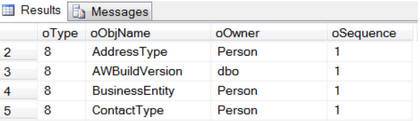
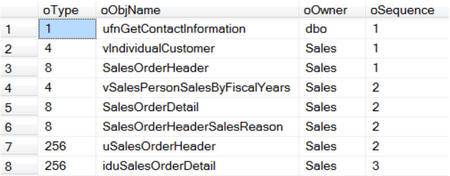
If we output all the dependencies with sp_msdependencies we get four columns: Type, ObjName, Owner(Schema), Sequence.
Pay attention to the sequence number (Sequence) - it starts at 1 and grows step by step. Sequence is the “order number” of the dependency.
I used this method a few times when I had to archive or delete on a very big database. If you know the dependencies of the table then you have a “road map” of the order in which you have to archive or delete the data. Start from the table with the biggest value in the Sequence column and move backwards from it, from bigger to smaller. Tables with the same Sequence value can be deleted at the same time. This method does not break any of the foreign key constraints and lets you move/delete records without temporarily dropping and rebuilding the constraints.
EXEC sp_msdependencies NULL    -- All the dependencies in the database

EXEC sp_msdependencies NULL, 3 -- The dependencies of a certain table
In SSMS, if you right click on the name of a table, you can pick “View Dependencies” and “Objects that depend on TABLENAME”:
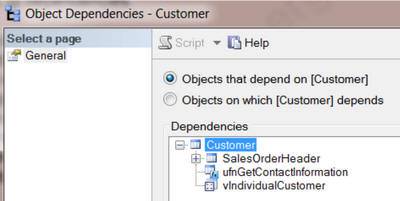
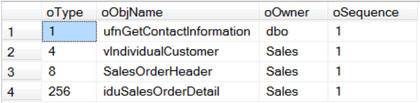
We can also get this information the following way:
-- sp_MSdependencies - Top level only
-- Objects that depend on the given object

EXEC sp_msdependencies N'Sales.Customer',null, 1315327 -- Change Table Name
If in SSMS, in the dependency view window, you pick “Objects that depend on TABLENAME” and then expand all the levels, we see the following:
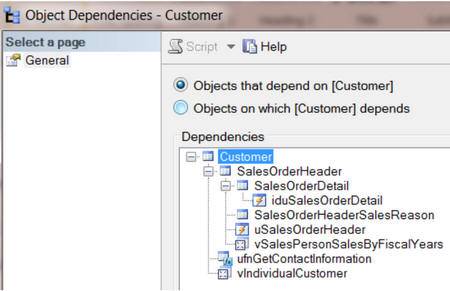
sp_msdependencies returns the very same information.
-- sp_MSdependencies - All the levels
-- Objects that depend on the given object

EXEC sp_MSdependencies N'Sales.Customer', NULL, 266751 -- Change Table Name
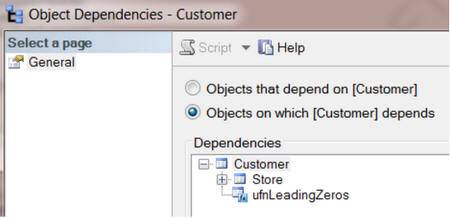
In SSMS we can also see which objects the selected table depends on.
If you want to get the list of the table dependencies you can use a temporary table to filter the dependencies by type.
CREATE TABLE #TempTable1
    (
      Type INT ,
      ObjName VARCHAR(256) ,
      Owner VARCHAR(25) ,
      Sequence INT
    );

INSERT  INTO #TempTable1
        EXEC sp_MSdependencies NULL

SELECT  *
FROM     #TempTable1
WHERE   Type = 8 --Tables
ORDER BY Sequence ,
        ObjName

DROP TABLE #TempTable1;
Queries to the system catalog views
The second method of “reverse engineering” the dependencies in your database is queries to the system catalog views related to the foreign keys.
--Independent tables

SELECT  Name AS InDependentTables
FROM    sys.tables
WHERE   object_id NOT IN ( SELECT  referenced_object_id
                             FROM   sys.foreign_key_columns )
                                                -- Check for parents
        AND object_id NOT IN ( SELECT parent_object_id
                                 FROM   sys.foreign_key_columns )
                                               -- Check for Dependents
ORDER BY Name

-- Tables with dependencies.

SELECT DISTINCT
        OBJECT_NAME(referenced_object_id) AS ParentTable ,
        OBJECT_NAME(parent_object_id) AS DependentTable ,
        OBJECT_NAME(constraint_object_id) AS ForeignKeyName
FROM    sys.foreign_key_columns
ORDER BY ParentTable ,
        DependentTable

-- Top level of the pyramid tables. Tables with no parents.

SELECT DISTINCT
        OBJECT_NAME(referenced_object_id) AS TablesWithNoParent
FROM    sys.foreign_key_columns
WHERE    referenced_object_id NOT IN ( SELECT  parent_object_id
                                        FROM    sys.foreign_key_columns )
ORDER BY 1

-- Bottom level of the pyramid tables.
-- Tables with no dependents. (These are the leaves on a tree.)

SELECT DISTINCT
        OBJECT_NAME(parent_object_id) AS TablesWithNoDependents
FROM    sys.foreign_key_columns
WHERE   parent_object_id NOT IN ( SELECT  referenced_object_id
                                    FROM    sys.foreign_key_columns )
ORDER BY 1

-- Tables with both parents and dependents.
-- Tables in the middle of the hierarchy

SELECT DISTINCT
        OBJECT_NAME(referenced_object_id) AS MiddleTables
FROM    sys.foreign_key_columns
WHERE    referenced_object_id IN ( SELECT  parent_object_id
                                    FROM    sys.foreign_key_columns )
        AND parent_object_id  NOT IN ( SELECT   referenced_object_id
                                        FROM    sys.foreign_key_columns )
ORDER BY 1;

-- in rare cases, you might find a self-referencing dependent table.
-- Recursive (self) referencing table dependencies.

SELECT DISTINCT
        OBJECT_NAME(referenced_object_id) AS ParentTable ,
        OBJECT_NAME(parent_object_id) AS ChildTable ,
        OBJECT_NAME(constraint_object_id) AS ForeignKeyName
FROM    sys.foreign_key_columns
WHERE    referenced_object_id = parent_object_id
ORDER BY 1 ,
        2;
Using a CTE
The third method of getting the hierarchy of the dependencies is using a recursive CTE.
-- How to find the hierarchical dependencies
-- Solve recursive queries using Common Table Expressions (CTE)

WITH     TableHierarchy (  ParentTable, DependentTable, Level )
          AS (

-- Anchor member definition (First level group to start the process)
               SELECT DISTINCT
                        CAST(NULL AS  INT) AS ParentTable ,
                        e.referenced_object_id AS DependentTable ,
                        0 AS Level
               FROM     sys.foreign_key_columns AS e
               WHERE    e.referenced_object_id NOT IN (
                        SELECT  parent_object_id
                        FROM    sys.foreign_key_columns )

-- Add filter dependents of only one parent table
-- AND Object_Name(e.referenced_object_id) = 'User'

               UNION ALL

-- Recursive member definition (Find all the layers of dependents)
               SELECT --Distinct
                        e.referenced_object_id AS ParentTable ,
                        e.parent_object_id AS DependentTable ,
                        Level + 1
               FROM     sys.foreign_key_columns AS e
                        INNER JOIN TableHierarchy AS d
                               ON ( e.referenced_object_id ) =
                                                      d.DependentTable
             )

    -- Statement that executes the CTE

SELECT DISTINCT
        OBJECT_NAME(ParentTable) AS ParentTable ,
        OBJECT_NAME(DependentTable) AS DependentTable ,
        Level
FROM     TableHierarchy
ORDER BY Level ,
        ParentTable ,
        DependentTable;
Conclusion
So in an hour or two you can get a decent picture of the insides of any database with the “reverse engineering” methods described above.