Размышления о кластеризации: Часть 4 - Нужно больше WEB’a
После продолжительного затишья решил продолжить повествование о разветвлении серверной линейки. Фраза получилась невнятной. По ходу дела она обретет смысл.
В предыдущих статьях о рассмотрел варианты конфигурации отдельных серевров для баз данных, сервера для раздичи статики и сервера для кеширования.
Предыдущие статьи:
Размышления о кластеризации: Часть 1
Размышления о кластеризации: Часть 2
Размышления о кластеризации: Часть 3
Дальше речь пойдет о увеличени количества серверов, обслуживающих динамический контент.
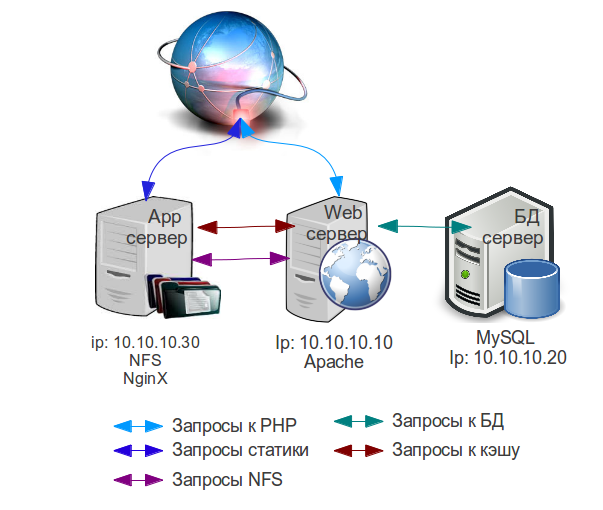
Во второй сатье я рекомендовал перенести весь контент на App сервер, установить на нем NFS сервер и замонтировать папку всего сайта на Web сервер. В рамках текущей статьи это уже не рекомендаци, а требование.
В таком случае у нас получается центральное хранилище контента, к которому можно обращаться с нескольких источников. Слабым местом будет пропускная способность сети между серверами, но в рамках одного датацентра она в несколько раз превышает скорость обмена данными между клиентами и самими серверами. Естественно лучше использовать NAS, но не все хостеры его предоставляют на приемлимых условиях, да и в большенстве случаев NAS нельзя подключить к виртуальным (cloud) серверам.
Возвращаемся с следующей схеме:
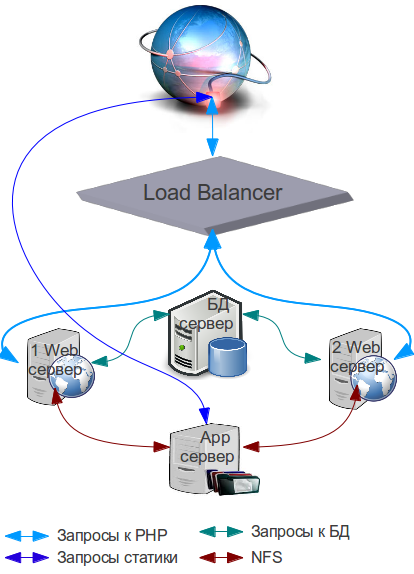
Вторым тебованием является балансировщик нагрузки. Большенство хостинг провайдэров предоставляют готовые решения. В те времена, когда трамваи не ходили и бородатые админы били бубном мамонтов, приходилось изощряться и использовать другие решения. Дальше по функциональности/популярности:
- Настройка HaProxy для балансировки нагрузки
- Балансировка нагрузки с помощью NginX
- Балансировка нагрузки с помощью Apache
- Varnish так же можно использовать для балансировки нагрузки
Теперь, когда у Вас есть балансировщик нагрузки и файлохранилище, можно создавать еще одну web-голову:
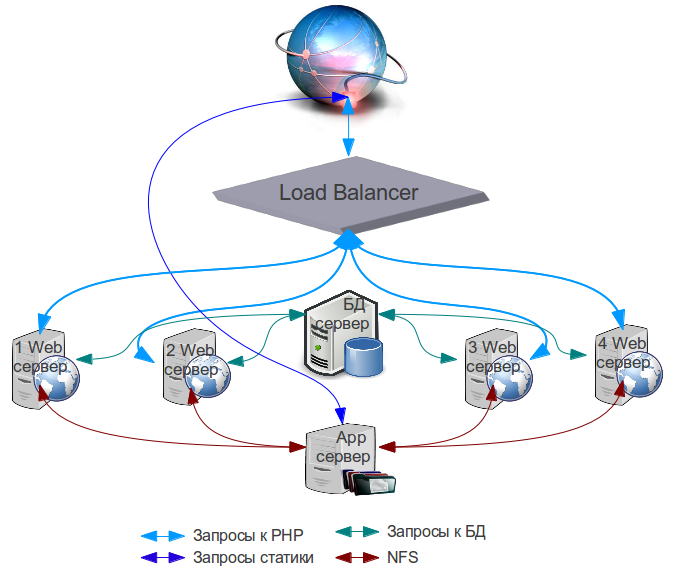
И даже 2 или 3:
Мение популярным методом доставки трафика является DNS балансировка. Сразу оговорюсь, что этот метод не подходит всем. Суть подхода заключется в том, что для каждой web головы Вы создаете отдельную А запись в DNS зоне и Ваш сайт начинает резолвиться с несколькими ip адресами. Вроде бы круто, да? Загвоздка заключается в том, что если один из серверов будет выключен, то часть вэб клиентов будут видеть ошибку, которая говорит, что сайт недоступен. Дело в том, что DNS сервера не проверяют жив ли сайт на том ip адресе, который вписан в зону.
Использовать трюк с DNS балансировкой можно в том случае, если Ваш хостинг провайдер не привязывает железно публичный ip адрес к каждому серверу, а позволяет Вам поднимать виртуальные сетевые интерфейсы и присваивать им ip адреса других серверов из выделенной Вам подсети, тем самым перебрасывать ip адреса между серверами.
В таком случае можно возпользоваться функционалом HeartBeet и настроить все сервера таким образом, что бы они подмимали виртуальные сетевые адаптеры с недоступными ip адресами.
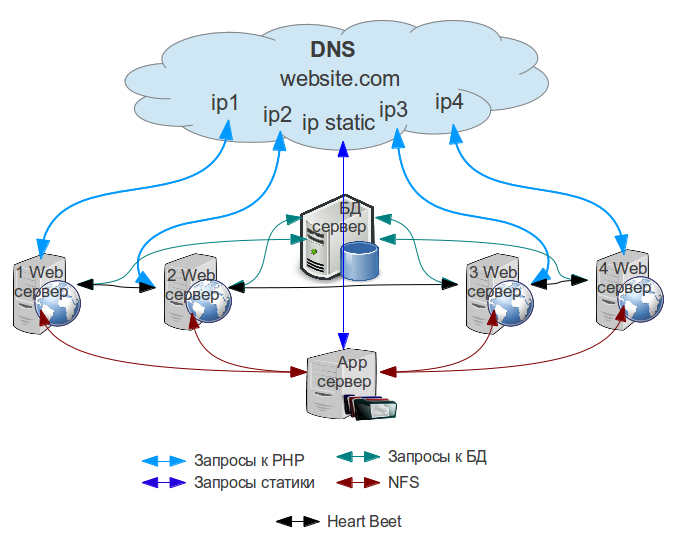
И первый и второй метод имеют свои преимущества и недостатки. К недостаткам использования балансировщика нагрузки относится то, что он является дополнительным звеном цепи, что влияет на скорость ответа от сайта. Но если Вы захотите автоматизировать горизонтальное скалирование кластера, то столкнетесь с проблемой автоматического создания ДНС записей, если вы не имеете единой точки входа такой, как балансировщик нагрузки. Конечно некоторые хостеры имеют API, которое позволяет создавать записи на их серверах доменных имен (nameservers) с помощью простого POST запроса (RackSpace), но ни у одного из популярных регистраторов доменных имен такого функционала нету.
Для отказоустойчивости очень хорошо комбинировать эти медоты. Тоесть имея 2 балансировщика нагрузки … дальше сами поняли 🙂