Thoughts on Clustering: Part 3 - Varnish Cache
Finally got my thoughts together to continue rambling about how to make life harder for yourself while cutting server load.
Previous articles:
Thoughts on Clustering: Part 1
Thoughts on Clustering: Part 2
In this article I want to talk about cache. Varnish is a great tool for caching your site. With the right approach, obviously. A lot of people naively think you should cache everything you possibly can. They’re very wrong. Varnish typically stores its cache in either a huge file on disk or in RAM. RAM is a limited resource, so it’s pretty dumb to store static data in it. And looking up an object’s hash in a huge file takes longer than just serving it from the app/web server. That’s exactly why I keep seeing badly configured Varnish setups that just add extra load on the servers without any reasonable performance gain.
Why the rambling? Because next up is adding one more server to the existing cluster — one that not only routes traffic but also caches dynamic content.
The general idea is this:
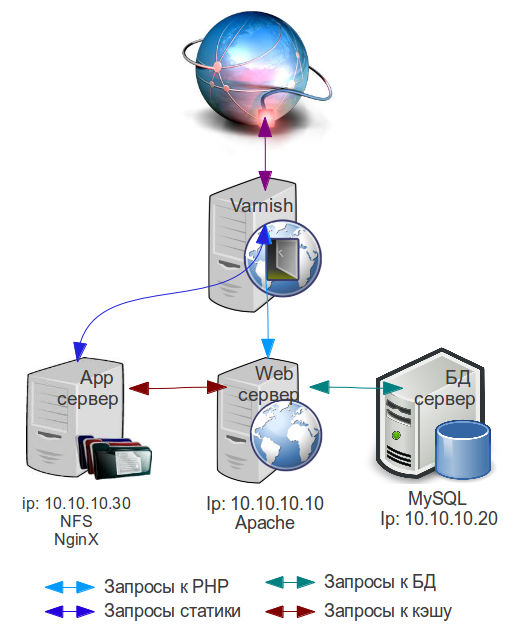
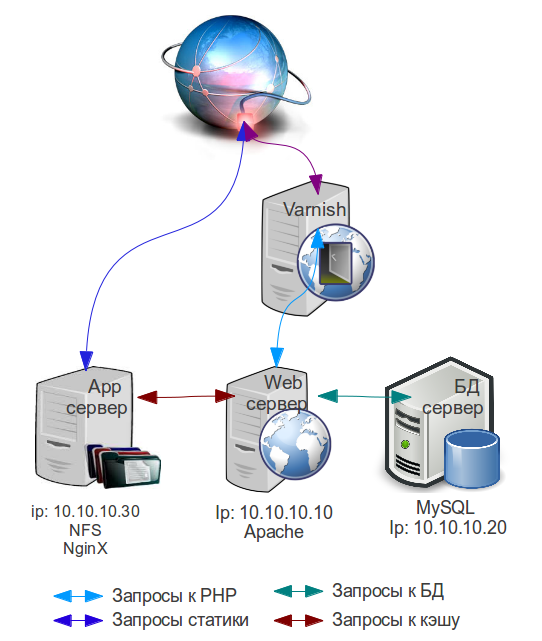
Varnish runs on a separate server. The site’s domain name resolves to that server’s IP. If the page is found in cache - it’s served to the visitor, if not - the request goes to the web server, and the resulting page gets cached. Static content is served from the app server.
The cluster diagram (#1) looks like this:
You could also go with this one (diagram #2):
A separate server for Varnish is needed because the cache is meant to live in RAM. That speeds up response time 5-10x, which can only help your site’s overall SEO ranking. Since I’m covering a hypothetical case where the web server can no longer handle the flood of visitors, there’s no point loading that same web server back up with Varnish too.
Usually there’s no point loading the Varnish server with handling traffic for the app server too, since static content is much heavier and needs more CPU time. So the first setup only makes sense if for some reason the Rewrite trick I described in the previous part doesn’t work for you.
To set up Varnish you can use the corresponding article.
The Varnish config overview article can basically be used as a reference, and it’s enough for a working setup. I’d recommend analyzing your site’s pages and deciding which ones you actually want to exclude from caching, and for which ones to set a shorter cache lifetime.
If you have a blog that updates once a day, you don’t need to overthink it. Cache lifetime is set by the beresp.ttl directive in vcl_fetch. In the article it’s set to 86400 seconds = 24 hours as an example. In theory the cache gets cleared before you publish new content.
If some pages on your site get updated at random times, several times a day, then it makes sense to exclude them from caching with something like this in vcl_recv:
if (req.url == "^/(uri_1|uri_3|uri_3)") {
        return (pass);
    }
I’d also recommend making a page that lets you flush the Varnish cache. You can use this note
This page needs to live on the web server, have caching disabled for it, and you need to add the ip Varnish sees the web server as into acl purge.
Using this article as a base you can modify your site’s code to trigger a cache flush when, say, a comment gets added to a post. Meaning removing the article object from cache once a comment is added to it.
I still haven’t added any web servers to the cluster. That’ll be in the next articles.