Размышления о кластеризации. Часть 1 - Понятие кластер
Понятие кластер, подразумевает использование нескольких серверов при работе целостного приложения. Каждый из серверов в этом случае выполняет отведенную ему роль. Этой статьей я начинаю цикл о кластерах, их настройке и возможностях.
Всем известно, что можно взять выделенный сервер и развернуть на нем web-сайт. Установить web-сервер типа Apache или NginX. Залить файлы контента. Установить сервер баз данных, типа MySql, и развернуть на нем базу данных. Установить скриптовый компилятор, типа php или python, и настроить его на генерирование динамического контента с последующей его выдачей через установленный web-сервер.
В этом случае все находится в одном месте. При увеличении посещаемости вверенного ресурса, нагрузка на сервер будет неуклонно расти и, в случае высокой популярности ресурса, придется увеличивать мощности. Здесь есть 2 пути:
- Взять в аренду более мощный сервер и перенести на него весь контент.
- Разделить ресурсы и хранить их на нескольких серверах.
В случае увеличения количества серверов (горизонтальное скалирование), обслуживающих сайт, вводится понятие кластера. В приведенном мною примере рассмотрена одна из причин кластеризации.
Второй причиной может быть отказоустойчивость. В стиле Отряд не заметил потери бойца. Если ваш сайт вертится на десятке серверов, то падение одно из них не повлечет за собой падение сайта.
Самым простым вариантом является использование двух серверов:
- Web сервер
- Сервер баз данных.
Это самый базовый вариант кластера. Никаких дополнительных устройств. Сайт резолвится через ip адрес web сервера. В настройках сайта/приложения указывается ip адрес сервера баз данных для подключения к БД.
Принцип работы показан на следующей схеме:
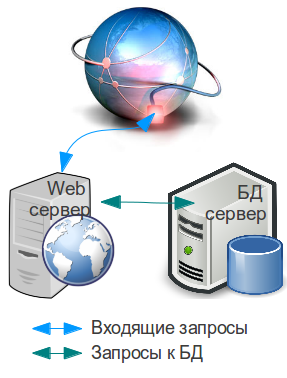
В случае с большинством популярных CMS и фрэймворков, основная нагрузка ложится на вэб сервер, поэтому есть смысл не заказывать сервера одинаковой мощности. Если у Вас есть сомнения о том, как распределить мощность приобретаемых серверов - смотрите в сторону более мощного вэб сервера.
Следующая статья:
Размышления о кластеризации: Часть 2