MySQL: setting up replication
OK. This isn’t an original article. There’s plenty like it on the internet already. I need it so I don’t have to google it every time I need a cheat sheet.
First, edit /etc/hosts on both servers with these lines:
mysql.master 192.168.10.10
mysql.slave 192.168.10.20
Change the IP addresses to your own.
To set up database replication in MySQL, first edit the config files /etc/my.cnf or /etc/mysql/my.cnf
On the master server, make these changes:
[mysqld]
server-id=1
log-bin=mysql-bin
innodb_flush_log_at_trx_commit=1
sync_binlog=1
Restart mysqld for the changes to take effect:
/etc/init.d/mysqld restart
Connect to mysql:
mysql -u root -p
Create a user for replication:
GRANT REPLICATION SLAVE ON \*.\* TO 'repl'@'%' IDENTIFIED BY 'password';
Change the username (repl) and password (password) to whatever you like.
Replication in mysql is based on data from the so-called binary log (binlog). It holds the transaction history. Roughly speaking, the slave server replays every action that happened on the master server and changed the database or databases.
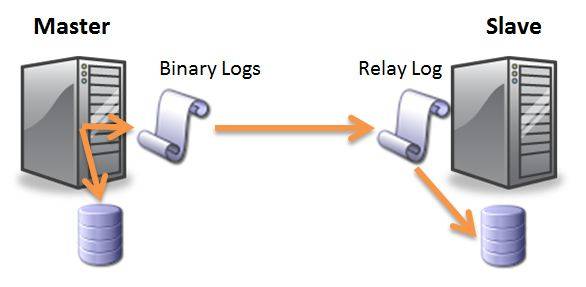
You need to take a snapshot of this log, i.e. get the current write position. Run this command:
mysql> show master status;
You get something like this:
+---------------+-----------+--------------+------------------+
| File          | Position  | Binlog_Do_DB | Binlog_Ignore_DB |
+---------------+-----------+--------------+------------------+
| binlog.000005 | 849349769 |              |                  |
+---------------+-----------+--------------+------------------+
1 row in set (0.00 sec)
We care about the value in the Position column. Remember it, copy it, write it down. This is exactly the point where replication on the new server will start from.
Now you can transfer all databases from the master server to the slave.
On the slave server, make these changes to /etc/my.cnf or /etc/mysql/my.cnf:
[mysqld]
server-id=2
log-bin=mysql-bin
innodb_flush_log_at_trx_commit=1
sync_binlog=1
slave-skip-errors = 1062
The last line is there to avoid errors like:
Last_SQL_Errno: 1062
               Last_SQL_Error: Error 'Duplicate entry ... for key 'PRIMARY'' on query.
Restart mysqld for the changes to take effect:
/etc/init.d/mysqld restart
Connect to mysql:
mysql -u root -p
At this point I assume all databases have already been restored on this server. To set the slave role, run this command:
CHANGE MASTER TO
MASTER_HOST='mysql.master',
MASTER_USER='repl',
MASTER_PASSWORD='password',
MASTER_LOG_FILE='binlog.000005',
MASTER_LOG_POS=849349769;
Then start the slave role:
START SLAVE;
Check the slave role status:
show slave status \G;
In the output, find these lines:
Slave_IO_Running: Yes
Slave_SQL_Running: Yes
If the values are anything other than Yes, you missed something or something went wrong. Read the mysql logs and find the root of evil.