Automating Database Transfers Between MSSQL 2008 Servers
Spitting on Windows server projects again. The other day I ran into a task - needed to move a few hundred databases from one server to another.
You can back up one database by hand and copy it to the new server. But imagine how much time and button-clicking it takes to move two or three hundred databases. The prospect scared me off and I started looking for ways to automate it.
In this case there are two ways to back up all the databases:
-
Using the Maintenance Plan tutorial, but it has its own downside - every file gets some gibberish tacked on at the end of its name, like
_backup_2014_06_11_125043_4220117, which can complicate importing it later. -
Generate a
tsqlscript to back up all the databases. That’s the method we’ll go with.
T-Sql syntax for backing up one database looks like this:
BACKUP DATABASE [database_name]
TO  DISK = N'D:\databases_backup\database_name.bak'
WITH NOFORMAT, NOINIT,
NAME = N'database_name_backup',
SKIP, REWIND, NOUNLOAD,  STATS = 10
T-Sql syntax for restoring a database from a file looks like this:
RESTORE DATABASE [database_name] FROM DISK = N'D:\databases_backup\database_name.bak'
If your MSSQL server, like mine, stores databases and logs not in the default location but on separate partitions (in my case E:\MSSQL\Data and F:\MSSQL\Log\), then the previous command doubles up:
RESTORE DATABASE [database_name]
FROM  DISK = N'D:\databases_backup\database_name.bak'
WITH FILE=1,
MOVE N'database_name' TO N'E:\MSSQL\Data\database_name.mdf',
MOVE N'database_name_log' TO N'F:\MSSQL\Log\database_name_log.ldf'
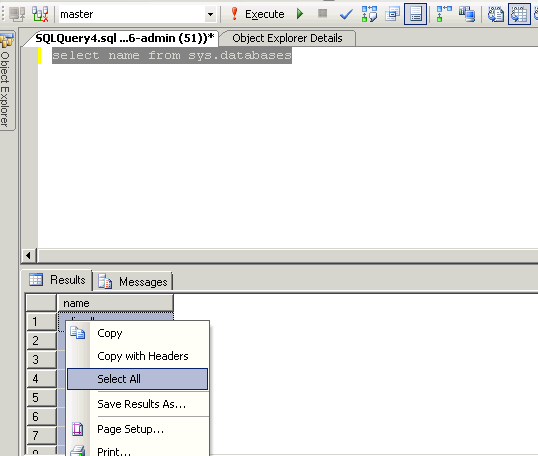
All that’s left is generating the scripts for all your databases. To get the list of databases, run this query in Management Studio:
select name from sys.databases

The list of databases will show up below. Right click, first pick Select all, then Copy
Next I used a bash script, you can use whatever’s convenient for you:
for f in $(cat list_databases.txt);
do
	echo "BACKUP DATABASE [$f] TO  DISK = N'D:\databases_backup\\"$f".bak'
	WITH NOFORMAT, NOINIT,  NAME = N'"$f"_backup', SKIP, REWIND, NOUNLOAD,  STATS = 1";
done >> tsql_data_backup.txt
for f in $(cat list_databases.txt); do
	echo "RESTORE DATABASE [$f] FROM  DISK = N'D:\databases_backup\\"$f"'
	WITH FILE=1, MOVE N'"$f"' TO N'E:\MSSQL\Data\\"$f".mdf', MOVE N'"$f"_log' TO N'F:\MSSQL\Log\\"$f"_log.ldf'";
done >> tsql_data_restore.txt
If you made the backup with the first method, list the files:
on the server, run this in the command line:
dir D:\databases_backup\ >> list_databases.txt
in bash use this script
for f in $(cat list_databases.txt |awk '{print $5}');
do
	db=$(echo $f |cut -d "_" -f 1);
	echo "RESTORE DATABASE [$db] FROM  DISK = N'D:\databases_backup\\"$f"' WITH FILE=1, MOVE N'"$db"' TO N'E:\MSSQL\Data\\"$db".mdf', MOVE N'"$db"_log' TO N'F:\MSSQL\Log\\"$db"_log.ldf'";
done >> tsql_data_restore.txt
You end up with two files:
- tsql_data_backup.txt
- tsql_data_restore.txt
Upload the first one to the source server, the second one to the destination server.
On the source server create the D:\databases_backup\ folder and run this in the command line:
sqlcmd -S localhost -i d:\tsql_data_backup.txt
The user running the console needs to have sysadmin access to the SQL server.
Running the script gets you files containing the database backups in the D:\databases_backup\ folder.
Copy them to the new server.
On the new server run this in the command line:
sqlcmd -S localhost -i d:\tsql_data_restore.txt
If needed, adjust the paths to the d:\tsql_data_backup.txt and d:\tsql_data_restore.txt files