Meet Django
Django is a web framework written in Python, that provides a basic set of components for building a site. This article is about exactly that. I’ll cover setting up the server, installing Django and creating the first site with this framework.
I’ll walk through it on Centos 6.5.
1. Python
First, let’s make sure the latest version of python is installed on the server:
python -version
The latest version as of today is 3.4.2. To install the latest version of python use the article
Installing the Latest Version of Python on Centos 6.5`
2. Installing PostgreSQL 9.4
Note that in our case we use pip3.4 to install the driver for Python:
pip3.4 install psycopg2
3. Installing Django and Creating the First Website:
Run the following command to install Django:
pip3.4 install django
Create the site:
python3.4 /usr/local/bin/django-admin.py startproject website
Edit the settings:
nano website/website/settings.py
Find the DATABASES section and edit it accordingly:
DATABASES = {
  'default': {
    'ENGINE': 'django.db.backends.postgresql_psycopg2',
    'NAME':'djangodb',
    'USER': 'djangodbuser',
      'PASSWORD': 'myPassword',
      'HOST': 'localhost',
      'PORT': '',
  }
}
After that run:
python3.4 website/manage.py migrate
If you’re working in an isolated environment - during the process it will ask about creating a superuser for django (not root). Better to create one.
When it’s done, start the mini server:
python3.4 website/manage.py runserver
As a result we get:
Performing system checks ...

System check identified no issues (0 silenced).
February 05, 2015 - 09:45:27
Django version 1.7.4, using settings 'website.settings'
Starting development server at http://127.0.0.1:8000/
Quit the server with CONTROL-C.
This means the mini server started on port 8000 and is only accessible on 127.0.0.1.
4. Configuring Apache
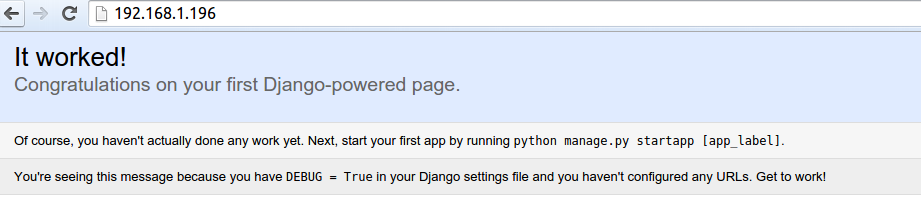
Now try pointing your browser at your server’s ip address. You should see Django’s empty start page:
A useful site with templates:
http://mezzanine.jupo.org/
Sources used:
techarena51.com
cyberciti.biz
docs.djangoproject.com
thecodeship.com