Amazon CloudFront and the Access-Control-Allow-Origin error
The other day we deployed a Magento shop in the Amazon cloud. Everything would be fine, but the browser console keeps showing the following error:
Font from origin 'https://blablabla.cloudfront.net' has been blocked from loading by Cross-Origin Resource Sharing policy: No 'Access-Control-Allow-Origin' header is present on the requested resource. Origin 'https://blablabla.com' is therefore not allowed access.
The block I added to the nginx config was successfully ignored by the browser.
location ~* \.(eot|ttf|woff)$ {
    add_header Access-Control-Allow-Origin *;
}
As it turned out later, the Access-Control-Allow-Origin header was simply cut from the objects stored in CloudFront. CloudFront itself strips all the headers from the cached files. The headers you need have to be added to the whitelist in the CDN settings.
To do it, go to the CloudFront Global Content Delivery Network section in the AWS console, pick the distribution you need and open the Behaviours tab:
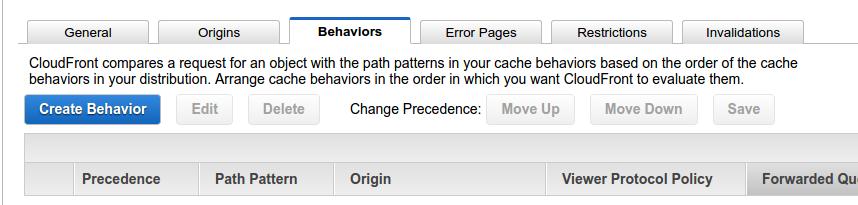
Then select what is in the list and press the Edit button, which becomes active.
On the new page pick Whitelist from the drop down next to Forward Headers
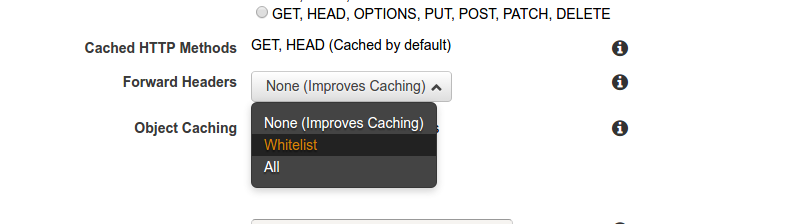
Two fields appear with buttons between them. You need to find the word Origin in the left field, select it and press the Add button
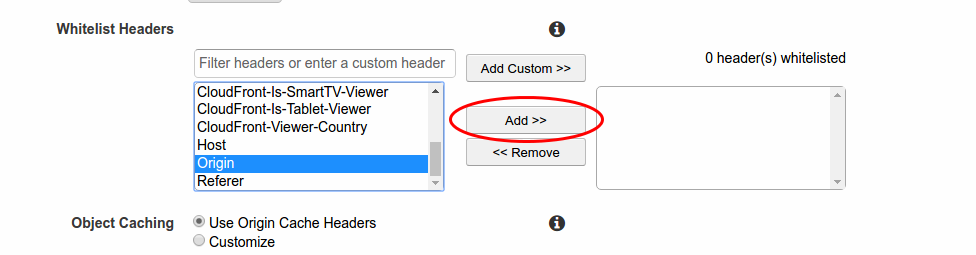
According to the Amazon docs, in that case the CDN service will add the header with the original domain name to all the objects in the cache.
Sources: