Подключение Linked Серверов в новом MSSQL
Настраивал второй MSSQL сервер для клиента и столкнулся с проблемой настройки Linked Servers на нем. На первом сервере имелось два линкованых инстанса MSSQL. Для подключения использовалась учетная запись ‘sa’.
В принцы пе нету ничего сложного в том, что бы вывести инфу об этих серверах в окно запроса. Смотри скриншот:
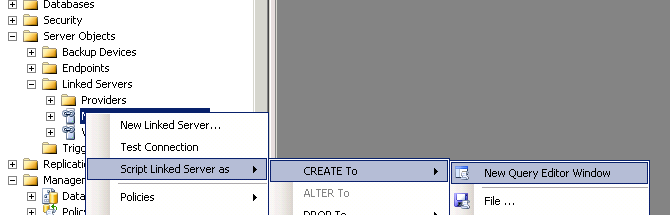
Думаю последовательность действий в Management Studio понятна и нету необходимости расписывать все по шагам.
Основная падлянка кроется в том, что пароли пользователей буду представлены в виде ‘######’, о чем свидетельствует вот такое сообщение в самом верху окна запроса:
/* For security reasons the linked server remote logins password is changed with ######## */
И действительно строка с пользователем выглядит вот так:
EXEC master.dbo.sp_addlinkedsrvlogin @rmtsrvname=N'_mssqlserver.net_',@useself=N'False',@locallogin=NULL,@rmtuser=N'sa',@rmtpassword='**########**'
Для того что бы раздобыть пароли, воспользуемся вот этим Powershell скриптом
Как вариант можно скачать готовый файл тут
Не закрываем SQL Management Studio.
Заливаем файл на первый сервер. (распаковываем, если нужно).
Запускаем PowerShell с правами администратора
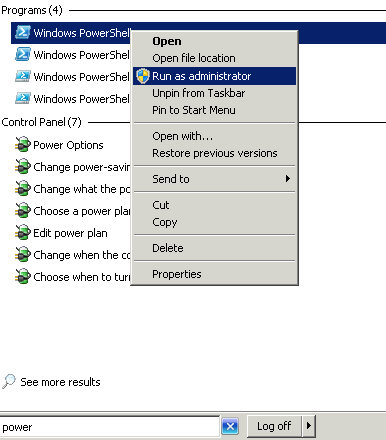
В консоли вводим:
Set-executionpolicy unrestricted
Получаем бяку в ответ:

Жмем Enter глядя ей в глаза.
Дальше импортируем загруженный скрипт:
import-module C:\Get-MSSQLLinkPasswords.psm1
Выполняем функцию:
Get-MSSQLLinkPasswords
В ответ получаем табличку с линкованными серверами, пользователями и паролями.
Возвращаемся в SQL Management Studio, копируем содержимое окна Query Editor. Подключаемся ко второму серверу с помощью Management Studio. Выбрав второй сервер, создаем новое окно запроса и вставляем в него содержимое содержимое из буфера обмена.
Находим строку похожую на эту:
EXEC master.dbo.sp_addlinkedsrvlogin @rmtsrvname=N'_mssqlserver.net_',@useself=N'False',@locallogin=NULL,@rmtuser=N'sa',@rmtpassword='**########**'
Меняем ######## на пароль нужного пользователя. Жмем Execute.
Датам: новый сервер появится в списке.