Отображение информации phpinfo в WordPress без ftp доступа к серверу
Если Вы столкнулись с такой же проблемой как и я - добро пожаловать. Обратился человек, говорит Все пропало. Доступа к серверу нету, имена, пароли, явки сменены. Нужно увезти сайт от плохих дядек. Тонкости описывать не буду - юзаем любой плагин для бэкапа.
Нужно было получить некоторые данные о сервере, которые как правило выводятся функцией phpinfo. Всем знакомая, добрая, да вот только без доступа к серверу нельзя создать php файл и вкинуть ее туда.
Благо дела админка WordPress дает возможность редактировать файлы темы. Создам функцию, которая возвращает результаты phphinfo, и вызову ее на любой из страниц сайта, - подумал я. Для получения информации не нужно даже сохранять изменения. Все можно увидеть на экране предварительного просмотра.
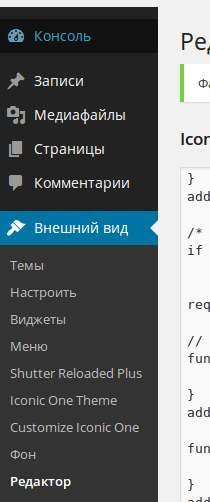
Итак логинимся в WordPress. Переходим в меню Внешний вид -> Редактор
Дальше в правой колонке под названием Шаблоны ищем файл functions.php:
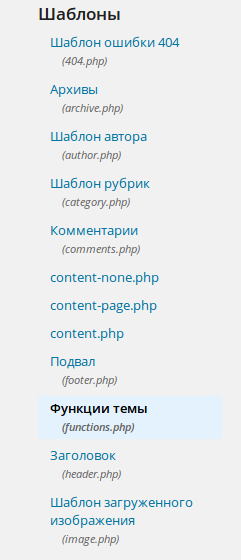
Выбираем его и код появляется в поле редактора. Тянем бегунок в самый конец и вкидываем туда вот такие строки:
function serverinfo() {
	return phpinfo();
}
add_shortcode('serverinfo', 'serverinfo');
Получается вот так:
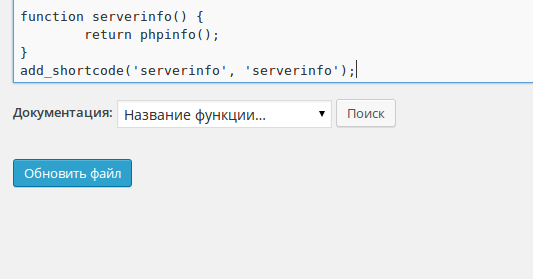
Жмем обновить файл.
Дальше переходим к существующим страницам, выбираем любую из них (лучше главную не выбирать) и пишем в любом месте (лучше самое начало или самый конец):
[serverinfo][/serverinfo]
В правом верхнем углу страницы жмем кнопку Просмотреть.

В результате таких рукоблудных махинаций открывается страница с результатами phpinfo(), соответственно с примененными стилями активной темы.