Как добавить AdSense в WordPress - functions.php
В догонку за первой статьей предлагаю Вашему вниманию альтернативный вариант, как еще можно добавить AdSense в WordPress без использования плагинов
Этот подход подразумевает создание функции, которая в свою очередь будет возвращать рекламный код в нужном месте.
Преимущества этого метода:
- рекламу можно будет вставлять в статьи используя short-тэг
- функцию можно вызывать в коде, допустим из content.php или index.php
По аналогии с первой статьей закидываем функцию загрузки adsbygoogle.js в footer.php
Если она у Вас уже там есть - нету смысла дублировать.
Дальше в админке из меню Внешний вид выберите пункт Редактор и найдите файл functions.php
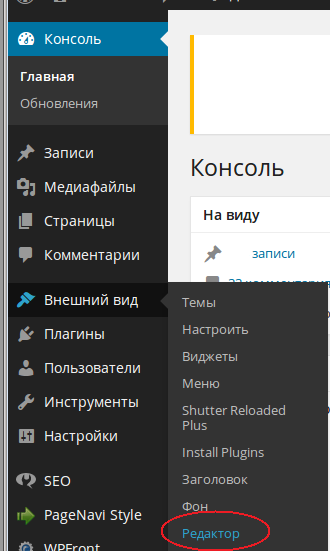
В самый конец добавьте следующую функцию (скопируйте код из аккаунта adsense):
function google_ads() {
return '<center><div id="adsenseads"><ins class="adsbygoogle"
     style="display:inline-block;width:728px;height:90px"
     data-ad-client="ca-pub-<strong>xxxxxxxxxxxxxxxx</strong>"
     data-ad-slot="<strong>xxxxxxxxxx</strong>;"></ins>
     <script>(adsbygoogle = window.adsbygoogle || []).push({});</script></div></center>';
}
add_shortcode('gads', 'google_ads');
Вызов функции в тексте
Теперь при использовании конструкции [gads][/gads] в тексте записи у Вас будет отображаться рекламный баннер AdSense
Для упрощения жизни - добавить кнопку в редактор
Вызов функции в коде
Для того, что бы рекламные блоки отображались на главной странице после загловка первого поста, добавьте следующую конструкцию в цикл <?php while ( have_posts() ) : the_post(); ?> файла index.php. Обратите внимание, что нужно редактировать файл в папке вашей темы (/wp-content/themes/theme-name). Что бы не промахнуться, воспользуйтесь редактором в админке WordPress:
<?php if ((($count == 0) && ($_SERVER["REQUEST_URI"] == "/")):?>
    <div style="padding:10px;" align="center"><?php google_ads(); ?></div>
<?php endif; $count++; ?>
Остальные функции создаются аналогично. Может также быть полезна статья Несколько полезных трюков для файла функций темы в WordPress