Ошибка пула IP адресов в Plesk
Случается так, что при работе с Plesk версии 10 вылетает ошибка пула ip адресов:
Error: There is no IP address x.x.x.x in the pool
Появляется она в том случае, когда ip адрес абонемента (subscription) меняется через Websites & Domains > Web Hosting Access. При этом пул IP адресов абонемента очищается. Проблема существует в Plesk 10.4.4 в случае если включена опция Open hosting operations в панели администрирования Tools & Settings > Interface Management.
Фикситься через базу данных. Для начала учтем, что Plesk работает с базой psa и сделаем запасную копию:
mysqldump -uadmin -p`cat /etc/psa/.psa.shadow ` psa > psa.sql
Дальше подключаемся к БД:
mysql -uadmin -p`cat /etc/psa/.psa.shadow ` psa
И выполняем следующий запрос. В результате получаем список пулов, у которых нету значения pool_id:
select distinct c.id, c.pname from clients c, domains d where d.cl_id = c.id and c.pool_id = 0;
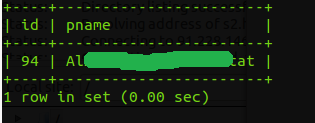
Дальше нужно узнать какой ip адрес был назначен клиенту с нашим idшником. Обратите внимание, что в значение c.id я подставил id с первого вывода:
select distinct ip.id, ip.ip_address from domains d, clients c, dom_param dp, IP_Addresses ip where ip.id = dp.val and dp.param = 'ip_addr_id' and dp.dom_id = d.id and d.cl_id = c.id and c.id = 94;
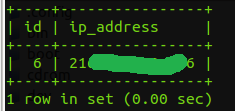
Теперь тип пула в котором значится наш ip адрес:
select type from ip_pool where id = (select pool_id from clients where type = 'admin') and ip_address_id = 6;

Узнаем значение последней записи в таблице ip_pool и прибавляем к ней единицу:
select max(id) + 1 from ip_pool;
Вставляем нужные значения в таблицу ip_pool. При этом учитываем номер последней записи в этой таблице, id ip адреса, который был назначен клиенту и тип ip адреса:
insert into ip_pool (id, ip_address_id, type) values (101, 6, 'shared');
Обновляем таблицу clients:
update clients set pool_id = 101 where id = 94;