Что такое LVM и с чем его едят
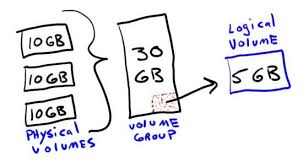
LVM - logical volume manager или мэнэджер логических дисков. С его помощью можно объединить несколько физических дисков в один логический и оперировать новым девайсом как единым диском.
Примерно выглядит вот так:
Для того что бы создать volume groupe на существующих дисках незамонтированных в корень файловой системы нужно из сначала обнулить:
dd if=/dev/zero of=/dev/sdd bs=512 count=1
dd if=/dev/zero of=/dev/sde bs=512 count=1
Потом создаем физические разделы:
pvcreate /dev/sdd
pvcreate /dev/sde
Создаем групу разделов (volume group):
vgcreate vg_storage /dev/sdd
Добавляем в нее еще один диск (по факту - расширяем volume group):
vgextend vg_storage /dev/sde
Создаем логический раздел (logical volume):
lvcreate -L 1G -n lv_var_www_html vg_storage
Если промахнулись с местом - добавьте еще:
lvextend -L +19.99G /dev/mapper/vg_storage-lv_var_www_html
resize2fs /dev/mapper/vg_storage-lv_var_www_html
Удостоверимся что новый раздел был создан:
ls -la /dev/mapper/
или
lvdisplay
Создаем на нем файловую систему:
mkfs -t ext4 /dev/mapper/vg_storage-lv_var_www_html
Редактируем /etc/fstab:
/dev/mapper/vg_storage-lv_var_www_html /var/www/html ext4 defaults 0 0
Перед тем как монтировать нужно создать точку монтирования:
mkdir -p /var/www/html
Монтируем
mount -a
Увеличить размер logical voluma можно на лету (on-fly):
lvextend -L +19.99G /dev/mapper/vg_storage-lv_var_www_html
resize2fs /dev/mapper/vg_storage-lv_var_www_html
Естественно рекомендуется перед этим отмонтировать раздел, но у меня всегда и так работало.
На всякий случай:
umount /dev/mapper/vg_storage-lv_var_www_html
Подведем итоги:
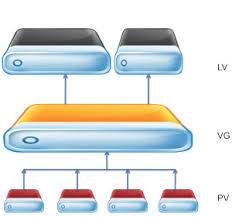
Функционал LVM позволяет обединить физические диски (pv - physical volume) в единое облако или дисковое пространство (vg - volume group) которое можно раздить на разделы (lv - logical volume).
Черпал вдохновление со следующих сайтов: