IIS, PHP, OpenSource CMS и зайцы
Лично я считаю хостинг open-source проектов на Windows Server кощунством, глупостью и моральной неполноценностью. Но случается проект, в котором у клиента основной сайт написан на .NET а параллельно с ним лежит небольшой блог на WordPress или другой CMS.
Соответственно все это обслуживает набор Win2008+PHP+ASP.NET+MSSQL+MySql+IIS7.
Сегодня столкнулся вот такой проблемой:
Иду в админку WordPress, создаю новую запись, добавляю в нее медиа файл, выбираю размер изображения Полный и.. Изображение не отображается. Уменьшенные изображения работают, а вот полное - нет. При переходе по прямой ссылке на изображение - 500-я ошибка.

Оказывается, когда мы загружаем файл через php форму, то сначала он (файл) отправляется в папку C:\Windows\Temp (таким по умолчания установлено значение php.upload_tmp_dir). Потом из этого каталога загруженный файл отправляется в нужное место (типа /wp-content/uploads/2014/2). При этом файл унаследует права папки C:\Windows\Temp. Уменьшенные варианты изображения создаются уже в конечной папке, они отображаются без ошибок потому что пользователь IIS (AppPool user) имеет все права на них.
Для того, что бы исправить это недоразумение, нужно дать IIS пользователю право модифицировать (достаточно даже чтения) на папку C:\Windows\Temp.
Нужно для начала посмотреть под кем выполняется ApplicationPool сайта:
Запускаем IIS Manager -> Application Pools. Жмем правой кнопкой на нужном пуле и выбираем Advanced Settings из выпавшего меню:
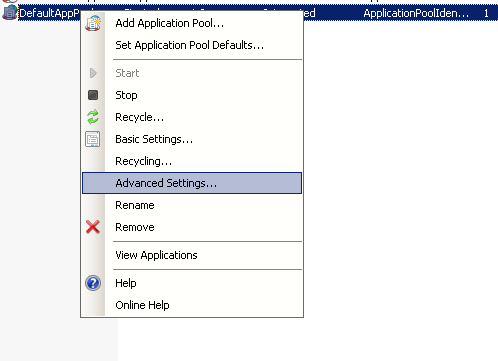
В разделе Process Model смотрим на Identity.

Если пул выполняется под ApplicationPoolIdentity - нужно давать права группе IIS_IUSRS или пользователю IIS_IUSR на папку C:\Windows\Temp.
Если у Вас там написано NetworkService - соответственно даем права группе NetworkService.
После таких преобразований все ново-загруженные файлы будут работать корректно.
Для уже загруженных файлов нужно выставить права вручную. Можно просто пере-применить права доступа на родительский каталог. Все подкаталоги и файлы унаследуют права от родителя.
ps: не думал, что у меня появится рубрика IIS 🙁